> ## Documentation Index
> Fetch the complete documentation index at: https://docs.kaireonai.com/llms.txt
> Use this file to discover all available pages before exploring further.
# Journeys
> Multi-step customer engagement workflows with a visual flow editor for orchestrating decisions over time.
**See also**: [Journeys REST API reference](/api-reference/journeys) for request/response shapes, status codes, and error semantics.
## Overview
**Journeys** are multi-step customer engagement workflows that orchestrate a sequence of Next-Best-Action (NBA) decisions, waits, branches, and actions over time. Unlike a single Decision Flow that produces an instant recommendation, a journey guides a customer through a series of interactions over days or weeks.
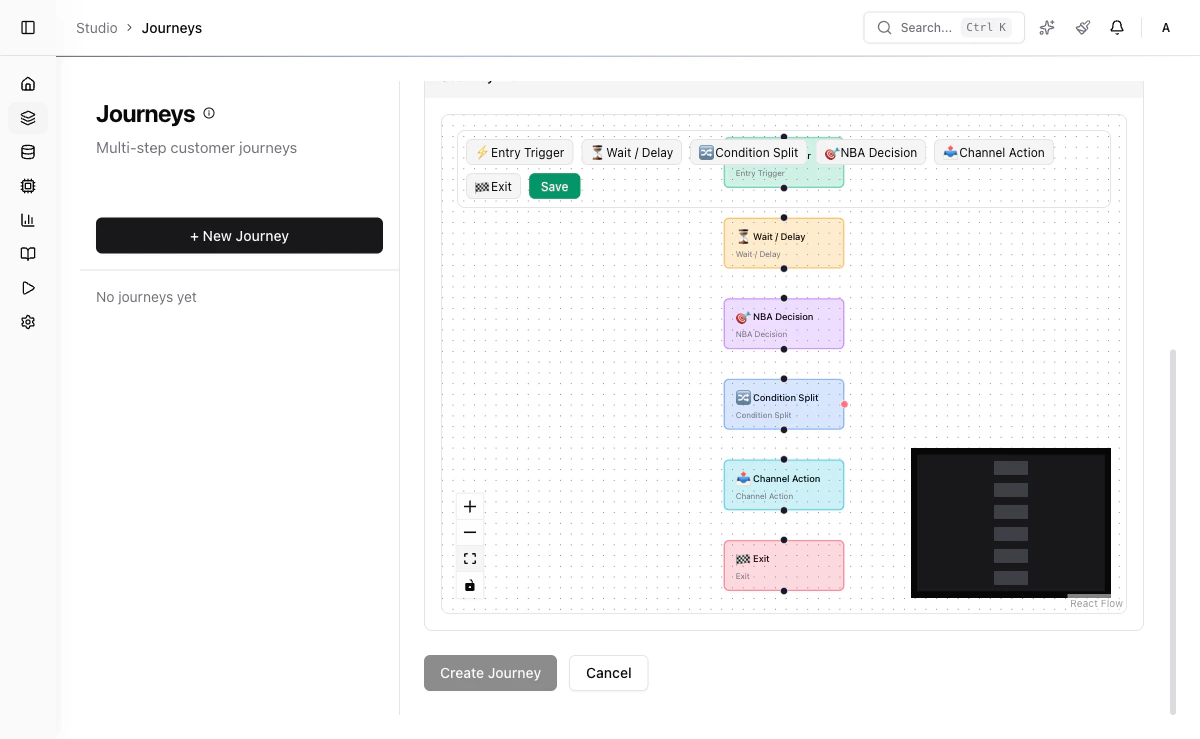 ## Visual Flow Editor
You build journeys using a visual drag-and-drop flow editor. Each journey is a directed graph of steps connected by transitions. The editor supports:
* Drag-and-drop step placement
* Visual connection of steps with edges
* Step configuration panels
* Real-time validation of flow structure
### Keyboard Shortcuts
| Shortcut | Action |
| -------------------- | ----------------------- |
| Ctrl/Cmd + Z | Undo last action |
| Ctrl/Cmd + Shift + Z | Redo last undone action |
Undo/redo buttons are also available in the editor toolbar.
## Step Types
| Step Type | Icon | Description |
| ----------------- | ----- | ---------------------------------------------------------------------- |
| `entry_trigger` | Play | Define how customers enter the journey (segment membership or event) |
| `wait` | Clock | Pause the journey for a specified duration or until an event arrives |
| `nba_decision` | Brain | Execute a Decision Flow and select the best offer |
| `condition_split` | Split | Evaluate a field condition and route the customer down different paths |
| `channel_action` | Send | Deliver a recommendation through a channel |
| `exit` | Stop | End the journey with a reason |
### Entry Trigger Step
Defines the entry point for the journey. Customers can enter via segment membership, an inbound event, or both.
```json theme={null}
{
"type": "entry_trigger",
"config": {
"segmentId": "seg_premium_customers",
"eventType": "customer.updated",
"condition": {}
}
}
```
### Wait Step
Pauses the journey for a configurable duration before proceeding to the next step.
```json theme={null}
{
"type": "wait",
"config": {
"delayHours": 48
}
}
```
**Runtime behavior:** The engine enqueues a delayed job for the enrollment (`delayHours` from now, default 24). When the delay elapses, the worker advances the enrollment to the next step. The editor also shows a `waitForEvent` field, but event-based early resume is **not yet implemented** — the value is saved with the definition and ignored by the engine; only the timer resumes the journey. (To pause for an *external* signal, author a `webhook_wait` node via the API instead — see the [callback endpoint](/api-reference/journeys#post-apiv1journeyscallbacktoken).)
### NBA Decision Step
Executes a [Decision Flow](/decisioning/decision-flows) to select the best offer for the customer at this point in the journey. This triggers an internal Recommend API call scoped to the customer.
```json theme={null}
{
"type": "nba_decision",
"config": {
"decisionFlowKey": "df_personal_loans",
"limit": 1
}
}
```
**Runtime behavior:** The engine calls the Recommend API internally with the customer's ID and any context accumulated from prior steps. The response (ranked offers) is stored on the enrollment record so downstream steps can reference it.
### Condition Split Step
Evaluates a field condition and routes the customer to different subsequent steps based on the result.
```json theme={null}
{
"type": "condition_split",
"config": {
"field": "customer.segment",
"operator": "eq",
"value": "premium"
}
}
```
**Runtime behavior:** The engine evaluates the condition against the customer's current data (enriched attributes, prior step results). If the condition is true, the customer follows the "true" edge; otherwise, the "false" edge. Supported operators are standard comparison operators: `eq`, `neq`, `gt`, `gte`, `lt`, `lte`, `in`, `contains`.
### Channel Action Step
Delivers a recommendation or message through a specified channel.
```json theme={null}
{
"type": "channel_action",
"config": {
"channelId": "ch_email",
"creativeId": "treat_loan_email_v1"
}
}
```
**Runtime behavior:** The engine looks up the channel's delivery configuration and dispatches the message. For API-mode channels (push, in-app), the payload is sent to the provider endpoint. For file-mode channels (email batch, CSV export), the record is appended to the channel's output batch. Delivery status is recorded on the enrollment step record.
### Exit Step
Terminates the customer's journey with a reason code.
```json theme={null}
{
"type": "exit",
"config": {
"reason": "completed"
}
}
```
## Testing a journey (dry run)
Before activating a journey, use **Test Mode** to run a single customer through the whole flow and see exactly what would happen — the journey builder's **Test** button (top toolbar) opens the test panel.
Test Mode is a **real-engine dry run**: it evaluates condition splits with the production operator logic and calls the **real** decision engine for NBA Decision steps (previewing draft flows), so the offers you see are the offers that customer would actually get. To keep a test safe and instant, it differs from a live run in three ways:
* **Waits are fast-forwarded** — a "wait 48h" step is recorded and stepped past immediately, so you see the full path in one run.
* **Sends are simulated** — Channel Action steps report what *would* be sent (`creative` via `channel`) but deliver nothing.
* **Nothing is persisted** — no enrollment row is created and no queue jobs are scheduled.
Test Mode and the live engine resolve each node's type through the same helper, so a dry run cannot branch differently from the real run. They did not always: the runner read `data.nodeType` before falling back to `type`, while the engine read `type` alone, so a journey created through the API or MCP with the type in `data.nodeType` only was routed down **opposite branches** of a condition split by the two. The editor writes `type`, so journeys authored in the studio were never affected. Both readers now share one resolver.
**Inputs:**
* **Customer ID** (optional) — loads that customer's real attributes, so condition splits and decisions run against real data.
* **Synthetic attributes** (optional JSON) — overlaid on top of (or used instead of) the real attributes, e.g. `{ "tier": "gold", "score": 72 }`, to explore how a hypothetical customer would branch.
**Output:** a step-by-step trace (each step's label, detail, the branch taken at splits, and the offers returned by decision steps), the run outcome (`exited`, `completed`, or an `ended (...)` reason such as a cycle or a dangling edge), and the visited path highlighted on the canvas with numbered badges. The API returns `visitedNodeIds` for the highlight and a `notes` list restating the fast-forward/simulation caveats.
Test Mode calls `POST /api/v1/journeys/{id}/test` — see the [Journeys API reference](/api-reference/journeys).
## Enrollment Lifecycle
Each customer enrollment in a journey progresses through its own lifecycle, independent of the journey-level status:
```
active → paused → completed
→ failed
```
| Enrollment Status | Description |
| ----------------- | -------------------------------------------------------------------------- |
| `active` | Customer is progressing through journey steps |
| `paused` | Customer is frozen in place (journey was paused or manual hold) |
| `completed` | Customer reached an exit step with a "completed" reason |
| `failed` | A step encountered an unrecoverable error (delivery failure, missing data) |
When a journey's status changes to `paused`, all active enrollments are also paused. When the journey is resumed to `active`, enrollments pick up where they left off. If the journey is `archived`, all enrollments are force-completed.
## Worked Example
A retail bank wants to nurture premium customers with personalized loan offers:
The entry trigger fires for customers in the `premium_customers` segment. Customer `cust_42` enters with enrollment status `active`.
A `wait` step with `delayHours: 48` pauses the journey. The scheduler records a resume time of 48 hours from now.
After the wait resolves, a `condition_split` step evaluates `customer.segment == "premium"`. Since `cust_42` is premium, they follow the "true" edge.
An `nba_decision` step triggers an internal Recommend API call with `decisionFlowKey: "df_personal_loans"` and `limit: 1`. The flow returns "Personal Loan Gold" as the top offer with a score of 0.91.
A `channel_action` step dispatches an email via channel `ch_email` using creative `treat_loan_email_v1`. The creative template is populated with the offer details from the decision step.
The customer reaches an `exit` step with reason `completed`. The enrollment status changes to `completed`.
## Field Reference
| Field | Type | Required | Description |
| ----------------- | ------ | -------- | ------------------------------------------------------------------ |
| `name` | string | Yes | Journey name (1-255 characters) |
| `description` | string | No | Description of the journey's purpose (max 2000 characters) |
| `definition` | object | No | Graph structure containing `nodes` and `edges` arrays |
| `entryCondition` | object | No | Criteria for customer enrollment (segment ID, event type, filters) |
| `maxDurationDays` | number | No | Maximum journey duration in days (1-365, default 30) |
| `status` | enum | Auto | Lifecycle status: `draft`, `active`, `paused`, `archived` |
### Step Node Fields
| Field | Type | Required | Description |
| -------- | ------ | -------- | -------------------------------------------------------------------------------------------- |
| `type` | enum | Yes | One of: `entry_trigger`, `wait`, `nba_decision`, `condition_split`, `channel_action`, `exit` |
| `config` | object | Yes | Type-specific configuration (see step type sections above) |
### Entry Trigger Config
| Field | Type | Required | Description |
| ----------- | ------ | -------- | ----------------------------------------- |
| `segmentId` | string | No | Segment to use for enrollment eligibility |
| `eventType` | string | No | Event type that triggers enrollment |
| `condition` | object | No | Additional filter conditions |
### Wait Config
| Field | Type | Required | Description |
| -------------- | ------ | -------- | ------------------------------------------- |
| `delayHours` | number | No | Hours to wait before advancing (default 24) |
| `waitForEvent` | string | No | Event type that can end the wait early |
### NBA Decision Config
| Field | Type | Required | Description |
| ----------------- | ------ | -------- | ---------------------------------------------- |
| `decisionFlowKey` | string | No | Key of the Decision Flow to execute |
| `limit` | number | No | Maximum number of offers to return (default 3) |
### Condition Split Config
| Field | Type | Required | Description |
| ---------- | ------ | -------- | ----------------------------------------------------------------------------- |
| `field` | string | Yes | Field path to evaluate (e.g., `customer.segment`) |
| `operator` | string | Yes | Comparison operator (`eq`, `neq`, `gt`, `gte`, `lt`, `lte`, `in`, `contains`) |
| `value` | any | Yes | Value to compare against |
### Channel Action Config
| Field | Type | Required | Description |
| ------------ | ------ | -------- | ---------------------------------------- |
| `channelId` | string | Yes | Channel to deliver through |
| `creativeId` | string | No | Creative template to use for the message |
### Exit Config
| Field | Type | Required | Description |
| -------- | ------ | -------- | -------------------------------------- |
| `reason` | string | No | Exit reason code (default `completed`) |
## Status Lifecycle
```
draft → active → paused → archived
```
| Status | Description |
| ---------- | ------------------------------------------------------------------- |
| `draft` | Being designed; no customers are enrolled |
| `active` | Live; new customers can be enrolled and existing customers progress |
| `paused` | No new enrollments; existing customers are paused in place |
| `archived` | Permanently retired; all enrolled customers are exited |
Archiving a journey immediately exits all enrolled customers. Any in-progress steps are terminated. Use **pause** instead if you want to temporarily halt without losing journey state.
## Creating a Journey
Go to **Studio > Journeys** in the sidebar.
Click the **+ New Journey** button.
Enter a name and description for the journey.
Configure the maximum number of days a customer can remain in the journey.
Use the visual editor to add steps, configure each step, and connect them with transitions.
Specify which customers should be enrolled (segment membership, event triggers, or manual enrollment).
Click **Validate** to check the journey structure for errors (unreachable steps, missing configurations).
Save as draft, test with a sample customer, then set status to **active** when ready.
## API Reference
### Create a Journey
```bash theme={null}
POST /api/v1/journeys
Content-Type: application/json
```
**Request body:**
```json theme={null}
{
"name": "Personal Loan Nurture",
"description": "3-week nurture journey for loan-interested customers",
"maxDurationDays": 21,
"entryCondition": {
"segmentId": "seg_loan_interested",
"minDaysSinceLastJourney": 30
},
"definition": {
"nodes": [
{
"id": "step_entry",
"type": "entry_trigger",
"config": { "segmentId": "seg_loan_interested" }
},
{
"id": "step_wait_2d",
"type": "wait",
"config": { "delayHours": 48 }
},
{
"id": "step_decide",
"type": "nba_decision",
"config": { "decisionFlowKey": "df_personal_loans", "limit": 1 }
},
{
"id": "step_send_email",
"type": "channel_action",
"config": { "channelId": "ch_email", "creativeId": "treat_loan_email_v1" }
},
{
"id": "step_check_response",
"type": "condition_split",
"config": { "field": "outcome", "operator": "eq", "value": "conversion" }
},
{
"id": "step_exit",
"type": "exit",
"config": { "reason": "completed" }
}
],
"edges": [
{ "source": "step_entry", "target": "step_wait_2d" },
{ "source": "step_wait_2d", "target": "step_decide" },
{ "source": "step_decide", "target": "step_send_email" },
{ "source": "step_send_email", "target": "step_check_response" },
{ "source": "step_check_response", "target": "step_exit" }
]
}
}
```
**Response (201 Created):**
```json theme={null}
{
"id": "jrn_loan_nurture",
"name": "Personal Loan Nurture",
"status": "draft",
"maxDurationDays": 21,
"createdAt": "2026-03-10T14:30:00Z",
"updatedAt": "2026-03-10T14:30:00Z"
}
```
### List Journeys
```bash theme={null}
GET /api/v1/journeys?status=active&limit=50&offset=0
```
**Query parameters:**
| Parameter | Type | Default | Description |
| --------- | ------ | ------- | ------------------------ |
| `status` | string | all | Filter by journey status |
| `limit` | number | 50 | Page size (max 200) |
| `offset` | number | 0 | Pagination offset |
### Update a Journey
```bash theme={null}
PUT /api/v1/journeys/:id
```
Active journeys can only be updated with non-structural changes (name, description). To modify steps, pause the journey first.
### Delete a Journey
```bash theme={null}
DELETE /api/v1/journeys/:id
```
Only `draft` journeys can be deleted. Active/paused journeys must be archived first.
## Next Steps
Automate journey enrollment with event-driven triggers.
Execute Decision Flows in batch against customer segments.
## Visual Flow Editor
You build journeys using a visual drag-and-drop flow editor. Each journey is a directed graph of steps connected by transitions. The editor supports:
* Drag-and-drop step placement
* Visual connection of steps with edges
* Step configuration panels
* Real-time validation of flow structure
### Keyboard Shortcuts
| Shortcut | Action |
| -------------------- | ----------------------- |
| Ctrl/Cmd + Z | Undo last action |
| Ctrl/Cmd + Shift + Z | Redo last undone action |
Undo/redo buttons are also available in the editor toolbar.
## Step Types
| Step Type | Icon | Description |
| ----------------- | ----- | ---------------------------------------------------------------------- |
| `entry_trigger` | Play | Define how customers enter the journey (segment membership or event) |
| `wait` | Clock | Pause the journey for a specified duration or until an event arrives |
| `nba_decision` | Brain | Execute a Decision Flow and select the best offer |
| `condition_split` | Split | Evaluate a field condition and route the customer down different paths |
| `channel_action` | Send | Deliver a recommendation through a channel |
| `exit` | Stop | End the journey with a reason |
### Entry Trigger Step
Defines the entry point for the journey. Customers can enter via segment membership, an inbound event, or both.
```json theme={null}
{
"type": "entry_trigger",
"config": {
"segmentId": "seg_premium_customers",
"eventType": "customer.updated",
"condition": {}
}
}
```
### Wait Step
Pauses the journey for a configurable duration before proceeding to the next step.
```json theme={null}
{
"type": "wait",
"config": {
"delayHours": 48
}
}
```
**Runtime behavior:** The engine enqueues a delayed job for the enrollment (`delayHours` from now, default 24). When the delay elapses, the worker advances the enrollment to the next step. The editor also shows a `waitForEvent` field, but event-based early resume is **not yet implemented** — the value is saved with the definition and ignored by the engine; only the timer resumes the journey. (To pause for an *external* signal, author a `webhook_wait` node via the API instead — see the [callback endpoint](/api-reference/journeys#post-apiv1journeyscallbacktoken).)
### NBA Decision Step
Executes a [Decision Flow](/decisioning/decision-flows) to select the best offer for the customer at this point in the journey. This triggers an internal Recommend API call scoped to the customer.
```json theme={null}
{
"type": "nba_decision",
"config": {
"decisionFlowKey": "df_personal_loans",
"limit": 1
}
}
```
**Runtime behavior:** The engine calls the Recommend API internally with the customer's ID and any context accumulated from prior steps. The response (ranked offers) is stored on the enrollment record so downstream steps can reference it.
### Condition Split Step
Evaluates a field condition and routes the customer to different subsequent steps based on the result.
```json theme={null}
{
"type": "condition_split",
"config": {
"field": "customer.segment",
"operator": "eq",
"value": "premium"
}
}
```
**Runtime behavior:** The engine evaluates the condition against the customer's current data (enriched attributes, prior step results). If the condition is true, the customer follows the "true" edge; otherwise, the "false" edge. Supported operators are standard comparison operators: `eq`, `neq`, `gt`, `gte`, `lt`, `lte`, `in`, `contains`.
### Channel Action Step
Delivers a recommendation or message through a specified channel.
```json theme={null}
{
"type": "channel_action",
"config": {
"channelId": "ch_email",
"creativeId": "treat_loan_email_v1"
}
}
```
**Runtime behavior:** The engine looks up the channel's delivery configuration and dispatches the message. For API-mode channels (push, in-app), the payload is sent to the provider endpoint. For file-mode channels (email batch, CSV export), the record is appended to the channel's output batch. Delivery status is recorded on the enrollment step record.
### Exit Step
Terminates the customer's journey with a reason code.
```json theme={null}
{
"type": "exit",
"config": {
"reason": "completed"
}
}
```
## Testing a journey (dry run)
Before activating a journey, use **Test Mode** to run a single customer through the whole flow and see exactly what would happen — the journey builder's **Test** button (top toolbar) opens the test panel.
Test Mode is a **real-engine dry run**: it evaluates condition splits with the production operator logic and calls the **real** decision engine for NBA Decision steps (previewing draft flows), so the offers you see are the offers that customer would actually get. To keep a test safe and instant, it differs from a live run in three ways:
* **Waits are fast-forwarded** — a "wait 48h" step is recorded and stepped past immediately, so you see the full path in one run.
* **Sends are simulated** — Channel Action steps report what *would* be sent (`creative` via `channel`) but deliver nothing.
* **Nothing is persisted** — no enrollment row is created and no queue jobs are scheduled.
Test Mode and the live engine resolve each node's type through the same helper, so a dry run cannot branch differently from the real run. They did not always: the runner read `data.nodeType` before falling back to `type`, while the engine read `type` alone, so a journey created through the API or MCP with the type in `data.nodeType` only was routed down **opposite branches** of a condition split by the two. The editor writes `type`, so journeys authored in the studio were never affected. Both readers now share one resolver.
**Inputs:**
* **Customer ID** (optional) — loads that customer's real attributes, so condition splits and decisions run against real data.
* **Synthetic attributes** (optional JSON) — overlaid on top of (or used instead of) the real attributes, e.g. `{ "tier": "gold", "score": 72 }`, to explore how a hypothetical customer would branch.
**Output:** a step-by-step trace (each step's label, detail, the branch taken at splits, and the offers returned by decision steps), the run outcome (`exited`, `completed`, or an `ended (...)` reason such as a cycle or a dangling edge), and the visited path highlighted on the canvas with numbered badges. The API returns `visitedNodeIds` for the highlight and a `notes` list restating the fast-forward/simulation caveats.
Test Mode calls `POST /api/v1/journeys/{id}/test` — see the [Journeys API reference](/api-reference/journeys).
## Enrollment Lifecycle
Each customer enrollment in a journey progresses through its own lifecycle, independent of the journey-level status:
```
active → paused → completed
→ failed
```
| Enrollment Status | Description |
| ----------------- | -------------------------------------------------------------------------- |
| `active` | Customer is progressing through journey steps |
| `paused` | Customer is frozen in place (journey was paused or manual hold) |
| `completed` | Customer reached an exit step with a "completed" reason |
| `failed` | A step encountered an unrecoverable error (delivery failure, missing data) |
When a journey's status changes to `paused`, all active enrollments are also paused. When the journey is resumed to `active`, enrollments pick up where they left off. If the journey is `archived`, all enrollments are force-completed.
## Worked Example
A retail bank wants to nurture premium customers with personalized loan offers:
The entry trigger fires for customers in the `premium_customers` segment. Customer `cust_42` enters with enrollment status `active`.
A `wait` step with `delayHours: 48` pauses the journey. The scheduler records a resume time of 48 hours from now.
After the wait resolves, a `condition_split` step evaluates `customer.segment == "premium"`. Since `cust_42` is premium, they follow the "true" edge.
An `nba_decision` step triggers an internal Recommend API call with `decisionFlowKey: "df_personal_loans"` and `limit: 1`. The flow returns "Personal Loan Gold" as the top offer with a score of 0.91.
A `channel_action` step dispatches an email via channel `ch_email` using creative `treat_loan_email_v1`. The creative template is populated with the offer details from the decision step.
The customer reaches an `exit` step with reason `completed`. The enrollment status changes to `completed`.
## Field Reference
| Field | Type | Required | Description |
| ----------------- | ------ | -------- | ------------------------------------------------------------------ |
| `name` | string | Yes | Journey name (1-255 characters) |
| `description` | string | No | Description of the journey's purpose (max 2000 characters) |
| `definition` | object | No | Graph structure containing `nodes` and `edges` arrays |
| `entryCondition` | object | No | Criteria for customer enrollment (segment ID, event type, filters) |
| `maxDurationDays` | number | No | Maximum journey duration in days (1-365, default 30) |
| `status` | enum | Auto | Lifecycle status: `draft`, `active`, `paused`, `archived` |
### Step Node Fields
| Field | Type | Required | Description |
| -------- | ------ | -------- | -------------------------------------------------------------------------------------------- |
| `type` | enum | Yes | One of: `entry_trigger`, `wait`, `nba_decision`, `condition_split`, `channel_action`, `exit` |
| `config` | object | Yes | Type-specific configuration (see step type sections above) |
### Entry Trigger Config
| Field | Type | Required | Description |
| ----------- | ------ | -------- | ----------------------------------------- |
| `segmentId` | string | No | Segment to use for enrollment eligibility |
| `eventType` | string | No | Event type that triggers enrollment |
| `condition` | object | No | Additional filter conditions |
### Wait Config
| Field | Type | Required | Description |
| -------------- | ------ | -------- | ------------------------------------------- |
| `delayHours` | number | No | Hours to wait before advancing (default 24) |
| `waitForEvent` | string | No | Event type that can end the wait early |
### NBA Decision Config
| Field | Type | Required | Description |
| ----------------- | ------ | -------- | ---------------------------------------------- |
| `decisionFlowKey` | string | No | Key of the Decision Flow to execute |
| `limit` | number | No | Maximum number of offers to return (default 3) |
### Condition Split Config
| Field | Type | Required | Description |
| ---------- | ------ | -------- | ----------------------------------------------------------------------------- |
| `field` | string | Yes | Field path to evaluate (e.g., `customer.segment`) |
| `operator` | string | Yes | Comparison operator (`eq`, `neq`, `gt`, `gte`, `lt`, `lte`, `in`, `contains`) |
| `value` | any | Yes | Value to compare against |
### Channel Action Config
| Field | Type | Required | Description |
| ------------ | ------ | -------- | ---------------------------------------- |
| `channelId` | string | Yes | Channel to deliver through |
| `creativeId` | string | No | Creative template to use for the message |
### Exit Config
| Field | Type | Required | Description |
| -------- | ------ | -------- | -------------------------------------- |
| `reason` | string | No | Exit reason code (default `completed`) |
## Status Lifecycle
```
draft → active → paused → archived
```
| Status | Description |
| ---------- | ------------------------------------------------------------------- |
| `draft` | Being designed; no customers are enrolled |
| `active` | Live; new customers can be enrolled and existing customers progress |
| `paused` | No new enrollments; existing customers are paused in place |
| `archived` | Permanently retired; all enrolled customers are exited |
Archiving a journey immediately exits all enrolled customers. Any in-progress steps are terminated. Use **pause** instead if you want to temporarily halt without losing journey state.
## Creating a Journey
Go to **Studio > Journeys** in the sidebar.
Click the **+ New Journey** button.
Enter a name and description for the journey.
Configure the maximum number of days a customer can remain in the journey.
Use the visual editor to add steps, configure each step, and connect them with transitions.
Specify which customers should be enrolled (segment membership, event triggers, or manual enrollment).
Click **Validate** to check the journey structure for errors (unreachable steps, missing configurations).
Save as draft, test with a sample customer, then set status to **active** when ready.
## API Reference
### Create a Journey
```bash theme={null}
POST /api/v1/journeys
Content-Type: application/json
```
**Request body:**
```json theme={null}
{
"name": "Personal Loan Nurture",
"description": "3-week nurture journey for loan-interested customers",
"maxDurationDays": 21,
"entryCondition": {
"segmentId": "seg_loan_interested",
"minDaysSinceLastJourney": 30
},
"definition": {
"nodes": [
{
"id": "step_entry",
"type": "entry_trigger",
"config": { "segmentId": "seg_loan_interested" }
},
{
"id": "step_wait_2d",
"type": "wait",
"config": { "delayHours": 48 }
},
{
"id": "step_decide",
"type": "nba_decision",
"config": { "decisionFlowKey": "df_personal_loans", "limit": 1 }
},
{
"id": "step_send_email",
"type": "channel_action",
"config": { "channelId": "ch_email", "creativeId": "treat_loan_email_v1" }
},
{
"id": "step_check_response",
"type": "condition_split",
"config": { "field": "outcome", "operator": "eq", "value": "conversion" }
},
{
"id": "step_exit",
"type": "exit",
"config": { "reason": "completed" }
}
],
"edges": [
{ "source": "step_entry", "target": "step_wait_2d" },
{ "source": "step_wait_2d", "target": "step_decide" },
{ "source": "step_decide", "target": "step_send_email" },
{ "source": "step_send_email", "target": "step_check_response" },
{ "source": "step_check_response", "target": "step_exit" }
]
}
}
```
**Response (201 Created):**
```json theme={null}
{
"id": "jrn_loan_nurture",
"name": "Personal Loan Nurture",
"status": "draft",
"maxDurationDays": 21,
"createdAt": "2026-03-10T14:30:00Z",
"updatedAt": "2026-03-10T14:30:00Z"
}
```
### List Journeys
```bash theme={null}
GET /api/v1/journeys?status=active&limit=50&offset=0
```
**Query parameters:**
| Parameter | Type | Default | Description |
| --------- | ------ | ------- | ------------------------ |
| `status` | string | all | Filter by journey status |
| `limit` | number | 50 | Page size (max 200) |
| `offset` | number | 0 | Pagination offset |
### Update a Journey
```bash theme={null}
PUT /api/v1/journeys/:id
```
Active journeys can only be updated with non-structural changes (name, description). To modify steps, pause the journey first.
### Delete a Journey
```bash theme={null}
DELETE /api/v1/journeys/:id
```
Only `draft` journeys can be deleted. Active/paused journeys must be archived first.
## Next Steps
Automate journey enrollment with event-driven triggers.
Execute Decision Flows in batch against customer segments.