

Overview
Journeys are multi-step customer engagement workflows that orchestrate a sequence of Next-Best-Action (NBA) decisions, waits, branches, and actions over time. Unlike a single Decision Flow that produces an instant recommendation, a journey guides a customer through a series of interactions over days or weeks.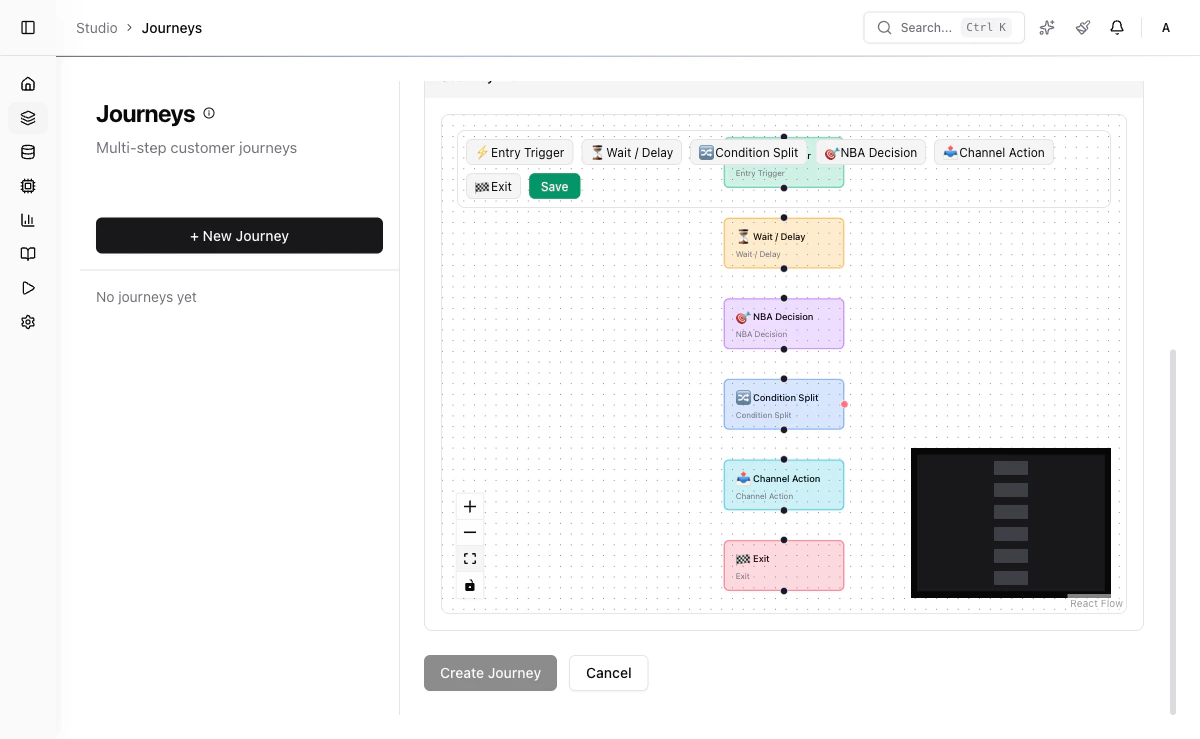
Visual Flow Editor
You build journeys using a visual drag-and-drop flow editor. Each journey is a directed graph of steps connected by transitions. The editor supports:- Drag-and-drop step placement
- Visual connection of steps with edges
- Step configuration panels
- Real-time validation of flow structure
Keyboard Shortcuts
| Shortcut | Action |
|---|---|
| Ctrl/Cmd + Z | Undo last action |
| Ctrl/Cmd + Shift + Z | Redo last undone action |
Step Types
| Step Type | Icon | Description |
|---|---|---|
entry_trigger | Play | Define how customers enter the journey (segment membership or event) |
wait | Clock | Pause the journey for a specified duration or until an event arrives |
nba_decision | Brain | Execute a Decision Flow and select the best offer |
condition_split | Split | Evaluate a field condition and route the customer down different paths |
channel_action | Send | Deliver a recommendation through a channel |
exit | Stop | End the journey with a reason |
Entry Trigger Step
Defines the entry point for the journey. Customers can enter via segment membership, an inbound event, or both.Wait Step
Pauses the journey for a configurable duration before proceeding to the next step. Optionally, awaitForEvent field can resume the journey early when a specific event arrives for the customer.
now + delayHours) on the enrollment record. A periodic scheduler polls for enrollments whose resume time has passed and advances them to the next step. If waitForEvent is set and that event arrives before the timer expires, the customer advances immediately.
NBA Decision Step
Executes a Decision Flow to select the best offer for the customer at this point in the journey. This triggers an internal Recommend API call scoped to the customer.Condition Split Step
Evaluates a field condition and routes the customer to different subsequent steps based on the result.eq, neq, gt, gte, lt, lte, in, contains.
Channel Action Step
Delivers a recommendation or message through a specified channel.Exit Step
Terminates the customer’s journey with a reason code.Enrollment Lifecycle
Each customer enrollment in a journey progresses through its own lifecycle, independent of the journey-level status:| Enrollment Status | Description |
|---|---|
active | Customer is progressing through journey steps |
paused | Customer is frozen in place (journey was paused or manual hold) |
completed | Customer reached an exit step with a “completed” reason |
failed | A step encountered an unrecoverable error (delivery failure, missing data) |
paused, all active enrollments are also paused. When the journey is resumed to active, enrollments pick up where they left off. If the journey is archived, all enrollments are force-completed.
Worked Example
A retail bank wants to nurture premium customers with personalized loan offers:Customer enters the journey
The entry trigger fires for customers in the
premium_customers segment. Customer cust_42 enters with enrollment status active.Wait 2 days
A
wait step with delayHours: 48 pauses the journey. The scheduler records a resume time of 48 hours from now.Branch on segment
After the wait resolves, a
condition_split step evaluates customer.segment == "premium". Since cust_42 is premium, they follow the “true” edge.NBA Decision
An
nba_decision step triggers an internal Recommend API call with decisionFlowKey: "df_personal_loans" and limit: 1. The flow returns “Personal Loan Gold” as the top offer with a score of 0.91.Send email
A
channel_action step dispatches an email via channel ch_email using creative treat_loan_email_v1. The creative template is populated with the offer details from the decision step.Field Reference
| Field | Type | Required | Description |
|---|---|---|---|
name | string | Yes | Journey name (1-255 characters) |
description | string | No | Description of the journey’s purpose (max 2000 characters) |
definition | object | No | Graph structure containing nodes and edges arrays |
entryCondition | object | No | Criteria for customer enrollment (segment ID, event type, filters) |
maxDurationDays | number | No | Maximum journey duration in days (1-365, default 30) |
status | enum | Auto | Lifecycle status: draft, active, paused, archived |
Step Node Fields
| Field | Type | Required | Description |
|---|---|---|---|
type | enum | Yes | One of: entry_trigger, wait, nba_decision, condition_split, channel_action, exit |
config | object | Yes | Type-specific configuration (see step type sections above) |
Entry Trigger Config
| Field | Type | Required | Description |
|---|---|---|---|
segmentId | string | No | Segment to use for enrollment eligibility |
eventType | string | No | Event type that triggers enrollment |
condition | object | No | Additional filter conditions |
Wait Config
| Field | Type | Required | Description |
|---|---|---|---|
delayHours | number | No | Hours to wait before advancing (default 24) |
waitForEvent | string | No | Event type that can end the wait early |
NBA Decision Config
| Field | Type | Required | Description |
|---|---|---|---|
decisionFlowKey | string | No | Key of the Decision Flow to execute |
limit | number | No | Maximum number of offers to return (default 3) |
Condition Split Config
| Field | Type | Required | Description |
|---|---|---|---|
field | string | Yes | Field path to evaluate (e.g., customer.segment) |
operator | string | Yes | Comparison operator (eq, neq, gt, gte, lt, lte, in, contains) |
value | any | Yes | Value to compare against |
Channel Action Config
| Field | Type | Required | Description |
|---|---|---|---|
channelId | string | Yes | Channel to deliver through |
creativeId | string | No | Creative template to use for the message |
Exit Config
| Field | Type | Required | Description |
|---|---|---|---|
reason | string | No | Exit reason code (default completed) |
Status Lifecycle
| Status | Description |
|---|---|
draft | Being designed; no customers are enrolled |
active | Live; new customers can be enrolled and existing customers progress |
paused | No new enrollments; existing customers are paused in place |
archived | Permanently retired; all enrolled customers are exited |
Creating a Journey
Build the flow
Use the visual editor to add steps, configure each step, and connect them with transitions.
Define entry conditions
Specify which customers should be enrolled (segment membership, event triggers, or manual enrollment).
Validate
Click Validate to check the journey structure for errors (unreachable steps, missing configurations).
API Reference
Create a Journey
List Journeys
| Parameter | Type | Default | Description |
|---|---|---|---|
status | string | all | Filter by journey status |
limit | number | 50 | Page size (max 200) |
offset | number | 0 | Pagination offset |
Update a Journey
Active journeys can only be updated with non-structural changes (name, description). To modify steps, pause the journey first.
Delete a Journey
draft journeys can be deleted. Active/paused journeys must be archived first.
Next Steps
Triggers
Automate journey enrollment with event-driven triggers.
Runs
Execute Decision Flows in batch against customer segments.